Windows
Phím tắt windows
| Tổ hợp phím | Mô tả |
|---|---|
Window + P |
Loại hiển thị nhiều màn hinh. |
Window + K |
Hiển thị màn hình cast |
Window + "." |
Chèn biểu tượng |
Window + "+" |
Bật magnifier để zoom màn hình windows |
Window + E |
Mở nhanh File Explorer |
Window + L |
Lock screen |
Window + Shift + S |
Chụp ảnh nhanh |
Ctrl + Shift + V |
Chỉ pass chữ |
Window + Shift + T |
Copy chữ từ hình |
Ctrl+ Shift + Esc |
Mở Task manager |
Regedit
- Đổi tên Network :Computer\HKEY_LOCAL_MACHINE\SOFTWARE\Microsoft\Windows NT\CurrentVersion\NetworkList\Profiles\
- Đổi đường dẫn các file User: Computer\HKEY_CURRENT_USER\Software\Microsoft\Windows\CurrentVersion\Explorer\Shell Folders
- Đổi tên Network: Computer\HKEY_LOCAL_MACHINE\SOFTWARE\Microsoft\Windows NT\CurrentVersion\NetworkList\Profiles\
- Đổi đường dẫn các file User: đổi xong khởi động lại máy tính
- Computer\HKEY_CURRENT_USER\Software\Microsoft\Windows\CurrentVersion\Explorer\User Shell Folders
- Computer\HKEY_LOCAL_MACHINE\SOFTWARE\Microsoft\Windows\CurrentVersion\Explorer\User Shell Folders
- Xóa AddIn
- OK nhất: Xóa nội dung này "C:\Users\QuocTrong Huynh\AppData\Local\Apps\2.0"
- Computer\HKEY_CURRENT_USER\SOFTWARE\Microsoft\Office\Excel
- Computer\HKEY_CURRENT_USER\SOFTWARE\Microsoft\VSTO\Security\Inclusion
- HKEY_CURRENT_USER\Software\Microsoft\VSTA\Solutions
- Computer\HKEY_CURRENT_USER\SOFTWARE\Microsoft\VSTO\SolutionMetadata
- Computer\HKEY_LOCAL_MACHINE\SOFTWARE\Microsoft.NETFramework\Security\TrustManager\PromptingLevel
- Computer\HKEY_CURRENT_USER\SOFTWARE\Microsoft\Office\16.0\Excel\Resiliency
- Đổi tên & đường dẫn Onedrive: Computer\HKEY_CLASSES_ROOT\CLSID
- Tăng chiều dài kich thước đường dẫn: Computer\HKEY_LOCAL_MACHINE\SYSTEM\CurrentControlSet\Control\FileSystem, Set là 1
- Reset ngày IDM dùng thử: Computer\HKEY_USERS\S-1-5-21-3088707195-1973892173-2419451525-1002_Classes\WOW6432Node\CLSID{07999AC3-058B-40BF-984F-69EB1E554CA7}
Các lệnh CMD
- regedit
- prefetch
- msconfig
- shutdown -s -t 300: Hẹn giờ tắt
- shutdown -a: Hủy hẹn giờ tắt
- ipconfig
- ping -t 192.168.0.1
- shell:startup: mở thư mục startup
- dxdiag: xem thông tin máy
- services.msc
- powercfg/batteryreport: báo cáo pin laptop
- sc delete "AdobeARMservice": xóa một service theo tên
- arp -a: Xem danh sách các IP
- ncpa.cpl, inetcpl.cpl: mở internet adapter, internet property
VPN L2TP/IPsec
- Lỗi hiện tại: "The network connection between your computer and the VPN server could not be established because the remote server is not responding. This could be ...Please contact your Administrator or your service provider to determine which device may be causing the problem."
- Cách khắc phục
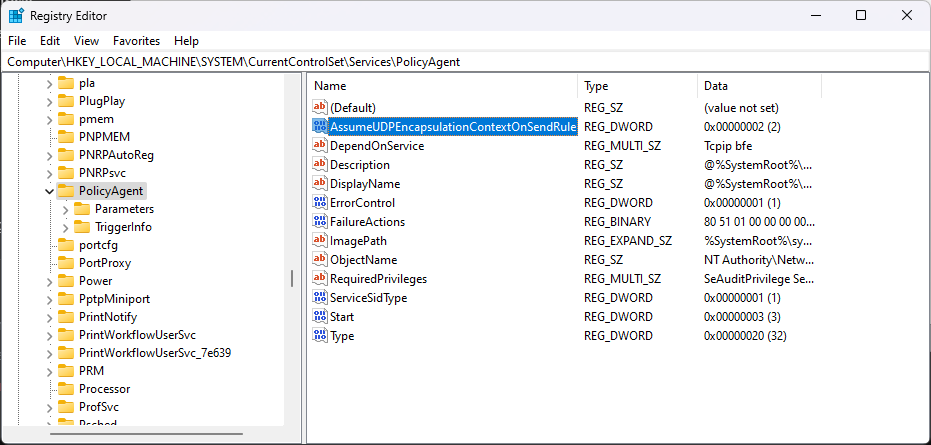
- Open Registry Editor, press "regedit".
- At the left pane, navigate to this key: "Computer\HKEY_LOCAL_MACHINE\SYSTEM\CurrentControlSet\Services\PolicyAgent"
- Right click and select New → DWORD (32 bit) Value.
- For the new key name type: AssumeUDPEncapsulationContextOnSendRule and press Enter.
- Double click at AssumeUDPEncapsulationContextOnSendRule value, type 2 at Value data and click OK.
- Close Registry Editor and reboot the machine.
Excell
Phím tắt excell
- Alt + down arrow: xem danh sách mình điền trong cột
- Ctrl + Shift + A / Ctrl + A : Hiện đối số trong công thức (arguments), hoặc nhấn vào nút Fx gần vị trí viết công thức
- Ctrl + 5: strikethrough
- Ctrl + K: để chèn nhanh hiberlink
- Ctrl + Shift + down arrow:
Các hàm cần nhớ
- LOOKUP: Tìm giả trị ở khoảng giữa, phải sắp xếp thứ tự dữ liệu trước, ví dụ sếp loại học sinh trong lớp
- IFERROR: Ẩn đi lỗi tìm hk ra của Vlookup
- Power(x,4): Hàm Lũy thừa
- Produc(x,y): hàm nhân
- COUNTIF(A2:E8,">50")
- DATE(D3,C3,B3)
- TIME(D12,C12,B12)
- EDATE: để tính ngày hết hạn
- Nên dùng đặt tên vùng, thay vì tạo bảng khi dùng hàm LOOKUP
AutoCAD
Các lệnh cần nhớ về thao tác
- REVCLOUD: vẽ đám mây để ghi chú.
- AL: Để scale toàn bộ đối tượng về 1 kích thước gì đó.
- TXT2MTXT: Chuyển TXT tới MTXT
- TCOUNT: Đánh số thứ tự
- BCOUNT: Đếm các Block
- CHAMFER: Cắt góc chéo
- FILLET: Bo góc
- OVERKILL: Xóa các đối tượng trùng
- CONVERT: Chuyển 2D polyline sang polyline bình thường.
- PEDIT: để close polyline.
- XRAY, RAY: tạo đường giống thẳng hàng:
- DIMLINEAR: Đo tuyến tính
- DIMCONTINUE: đo tiếp tục
- ATTSYNC: Đồng bộ các block có ATT
- CUI: Chỉnh giao diện, shortcut, ....
Các lệnh cần nhớ về trình bày bản vẽ
- PSLTSCALE: Thấy nét đứt trong layout (giá trị là 0 chỉnh lại linetype scale hợp lý).
- VPMAX: Thu nhỏ cửa sổ layout
- XCLIP: giới hạn khung nhìn một block.
- PS: Để thoát khỏi layout.
- SETBYLAYER: đưa các đối tượng về màu layer.
- WIPEOUTFRAME: Ẩn viền của wipeout
- WIPEOUTFRAME: Thấy boarder của wipeout
- LAYDEL: xóa layer
- PA: chọn cách dán từ excel
- BURST: đổi Block attribur to text
Các lệnh về cấu hình bản vẽ
- APPLOAD, NETLOAD: Để load app của mình viết.
- PROXYNOTICE: bằng 0 để ẩn hội thoại Proxy information khi bật 1 bản vẽ có chứa các đối tượng 3D được tảo bởi các phần mềm bên thứ 3
- FILEDIA: chọn 1 để bật cửa sổ lưu file
- /nologo: mất logo set trong shortcut
- /nosplash: ???
- Bỏ Preview cho nhẹ: Option → Preview → bỏ check
- Zoom → All
Revits
Kiến thức cần nhớ
- View Range: (Properties → View Range) Là khoảng nhìn thấy các vật thể khi vẽ
- View Template: View → View Template
- Thêm phím tắt: (File → Option → User Interface → Keyboard Shortcuts / KS)
- Chỉnh kích thước kí hiệu ống đi lên
- System → Mechanical Settings → Pipe Settings → Pipe Rise / Drop Annotation Size
Các lệnh cần nhớ
- TL: Thin Lines cho các nét nhỏ lại
- HI: Temporary Hide/lsclate
- HR: Reset Temporary Hide/lsclate
- KS: Để xem shortcut key
- VV/VR: Visibility Graphics
- TR:
- SL:
- CS: